
• Skip to primary navigation
  • Skip to main content
  • Skip to primary sidebar
  • Skip to footer
ControlUp Community

ControlUp Community

Connect, Learn, and Grow

  • Blog
  • Archives
  • Findings
  • Meetups
  • Videos
  • Events
  • Categories
    • ControlUp One Platform
    • ControlUp for Apps
    • ControlUp for Compliance
    • ControlUp Dashboards
    • ControlUp for Desktops
    • ControlUp for VDI
    • ControlUp Scripts & Triggers
    • ControlUp Synthetic Monitoring
    • ControlUp Workflows
  • Topics
    • Logos & Wallpaper
    • ControlUp.com
  • Join

Troubleshooting a Workflow Scheduling Issue in ControlUp.

Posted on June 10, 2026

Some users reported a workflow issue where a scheduled workflow still appeared as manual, even after changing it to scheduled. Another user suggested that selecting an interval and offset time may solve this issue. The post includes screenshots showcasing the problem and solution, and a user confirms that the issue has been resolved. The team has been alerted to this issue.


Read the entire ‘Troubleshooting a Workflow Scheduling Issue in ControlUp.’ thread below:

Has anyone experienced the workflow list not recognizing that a schedule workflow (that was once manual) is still listed as manual? And upon opening the workflow to see WTH happened, it still shows as scheduled?


Hi Paul,

Have not seen this. Perhaps a browser cache issue? Will try to replicate


Create 5 manual processes and then go into each one and change it to scheduled.

I may have been working too fast for the servers. lol


also possible, lol

Managed to reproduce this

Will alert team. Thanks @member!

@member FYI


I had the same problem but that was user error (or the user interface not being intuitive).

when changing from manual > scheduled, you need to specify both the interval (IE hourly) and on what offset it needs to happen (IE 5 mins past the hour, every hour). I neglected the 2nd part

Select a value here and new interface elements appear
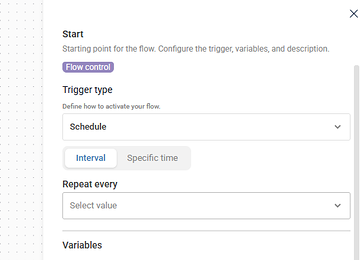
Pretty sure that at minute is not optional
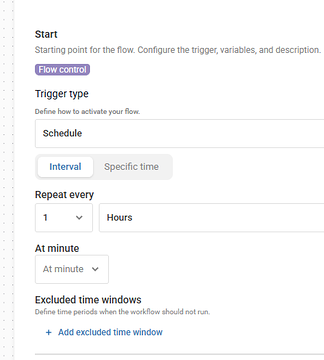
Without at minute
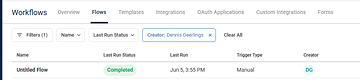
Even though the start node shows as "scheduled"
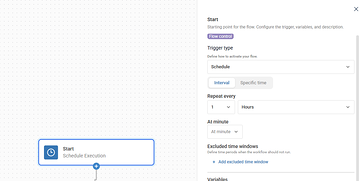
After setting at minute
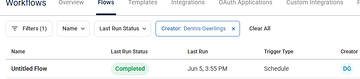
Granted, the UI should probably mark that field as required if it is required


Confirmed.


It seems to be working better now. Was able the schedule all of my workflows.

Continue reading and comment on the thread ‘Troubleshooting a Workflow Scheduling Issue in ControlUp.’.  Not a member? Join Here!


Categories: All Archives, ControlUp Scripts & Triggers, ControlUp Workflows
Topics: Automation & Alerting, Browsers, ControlUp Solve, Reporting

Ask Us Anything, Connect, Learn, and Grow with the ControlUp Community!

Login to the ControlUp Community to ask us anything, stay up-to-date on what’s new and coming soon and meet other like-minded techies like you.

Not already a member? Join Today!

Primary Sidebar

ControlUp Academy

Enroll in ControlUp Academy for expert-led technical training, equipping you with skills to effectively deploy, manage, and grow your ControlUp investment.

Learn here >

Rotating Images

Hidden Gem from our Community on Slack!

ControlUp Betas - What's Coming Next?
NEW ControlUp Features - Stay Up-to-Date!
ControlUp Scripts - Scripting, Zero to Hero
Latest KB Articles - Be the First to Learn

Video Tutorials Library

Visit our technical how-to videos, offering step-by-step tutorials on advanced features, troubleshooting, and best practices.

Watch here >

ControlUp Blog

Check out the ControlUp blog for expert advice and in-depth analysis.

Read here >

ControlUp Script Library

Visit the ControlUp technical script library, which offers a multitude of pre-built scripts and custom actions for your monitoring and troubleshooting requirements.

See here >

ControlUp Support

Visit the ControlUp support home and to delve deeper into ControlUp DEX solutions.

Browse here >

Footer


ControlUp Community
Of Techie, By Techie, For Techie!

Terms of Use | Privacy Policy | Security
Dive Deeper, Learn more at ControlUp.com

  • facebook
  • twitter
  • youtube
  • linkedin

© 2023–2026 ControlUp Technologies LTD, All Rights Reserved.

We use cookies to ensure that we give you the best experience on our website. by continuing to use this site you agree to our Cookie policy..