
A user is excited about new features on the ControlUp platform, including added support for Ping Identity as an Identity Provider. They are unsure of how to use Ping for multi-factor authentication and see that a "pairing code" is needed, but another user clarifies that this is the "secret key" from a "software token app." The article will focus on the new support for Ping Identity and how to use it for multifactor authentication on ControlUp.
Read the entire ‘Utilizing Ping Identity for Multi-Factor Authentication on ControlUp’ thread below:
Just saw this and am excited to configure.
Custom Hive 1239 (Nov 11)
New Features
• EUC Scouts: Added support for Ping Identity as an Identity Provider (IdP), allowing users to log into EUC scouts using Ping Identity for authentication.
In the scout config I am not seeing another option for PING ID. Made sure my custom hives are on 1239. I see the TOTP Code steps in the documentation, but not sure if that is the method I should be using for PING. Our registration for MFArequires us going to a web portal to login and pair our phones/YubiKey so seeing this screenshot showing the Citrix Netscaler login providing some sort of pairing code is new to me.
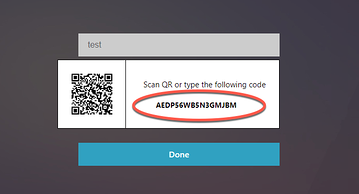
The "pair code" is actually the "secret key" from a "software token app" . In entraID you can register a phone number or "another Autenticatior app"
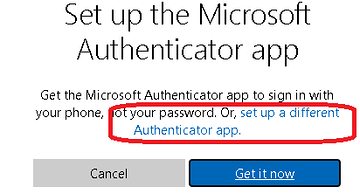
that would give you a qr code or a secret key.
that then can be used in the scout configuration.
Continue reading and comment on the thread ‘Utilizing Ping Identity for Multi-Factor Authentication on ControlUp’. Not a member? Join Here!
Categories: All Archives, ControlUp Synthetic Monitoring