
A discussion took place regarding the use of a script to collect pending Windows update reboots from all systems in a tenant. A screenshot of the JSON format was requested, and it was suggested to test the script as a script action on the device. Another script was shared that would output the JSON correctly. This script was suggested for use instead.
Read the entire ‘Collecting Pending Reboot Information in ControlUp’ thread below:
Good day,
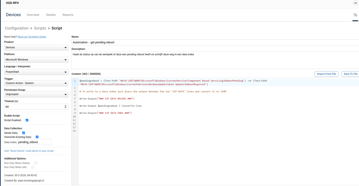
Im trying to collect a pending reboot for Windows update from all my systems in a tenant. When I run this script locally or from the remote shell option in Cu I get output in between
Write-Output("### SIP DATA BEGINS ###")
Write-Output $pendingreboot | ConvertTo-Json
Write-Output("### SIP DATA ENDS ###")
But when I run the script manually from the device view I doesnt create a new Data index. Am i missing something?
can you give a screenshot of the json? We only accept a single level of json data and I think this is multiple levels deep
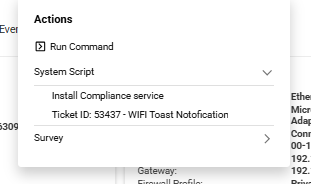
@member if you run a script action from with the device dose it work. Might be some limitations that the sip out puts are not processed via remote shell. (I’d need to confirm but if you could test as a script action)
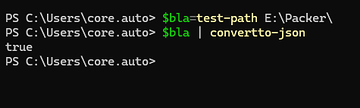
actually I look at it again and you get just a true or False in text that never converts to json so you need to create an object first
You could try this script
“`
.SYNOPSIS
Detects pending reboot status from multiple sources and outputs
data in ControlUp SBDC format for indexing.
.NOTES
Configure in ControlUp for Desktops > Configuration > Scripts:
– Trigger: Short/Long Interval Timer (or Once Per Day)
– Language: PowerShell
– Run Context: System
– Sends Data: Enabled
– Data Index: pending_reboot (or your preferred name)
– Overwrite Data: Enabled (you want latest state per device)
– Timeout: 60 seconds
>
——————————————————-
Fix UTF-8 encoding — safe for both interactive and
headless/service execution contexts (ControlUp agent)
——————————————————-
$OutputEncoding = [System.Text.Encoding]::UTF8
try { [Console]::OutputEncoding = [System.Text.Encoding]::UTF8 } catch {}
——————————————————-
Helper: Safe registry read (returns $null if missing)
——————————————————-
function Get-RegValue {
param([string]$Path, [string]$Name)
try {
$val = Get-ItemProperty -Path $Path -Name $Name -ErrorAction Stop
return $val.$Name
} catch {
return $null
}
}
——————————————————-
1. Windows Update / WSUS pending reboot
——————————————————-
$wuReboot = $false
$wuPath = "HKLM:\SOFTWARE\Microsoft\Windows\CurrentVersion\WindowsUpdate\Auto Update\RebootRequired"
if (Test-Path $wuPath) { $wuReboot = $true }
——————————————————-
2. Component-Based Servicing (CBS) pending reboot
——————————————————-
$cbsReboot = $false
$cbsPath = "HKLM:\SOFTWARE\Microsoft\Windows\CurrentVersion\Component Based Servicing\RebootPending"
if (Test-Path $cbsPath) { $cbsReboot = $true }
——————————————————-
3. Pending file rename operations
——————————————————-
$pendingFileRename = $false
$pfroValue = Get-RegValue `
-Path "HKLM:\SYSTEM\CurrentControlSet\Control\Session Manager" `
-Name "PendingFileRenameOperations"
if ($null -ne $pfroValue -and $pfroValue.Count -gt 0) {
$pendingFileRename = $true
}
——————————————————-
4. SCCM / ConfigMgr client pending reboot
——————————————————-
$sccmReboot = $false
try {
$sccmClient = [wmiclass]"\\.\root\ccm\clientsdk:CCM_ClientUtilities"
$sccmStatus = $sccmClient.DetermineIfRebootPending()
if ($sccmStatus.RebootPending -or $sccmStatus.IsHardRebootPending) {
$sccmReboot = $true
}
} catch {
# SCCM client not present — skip silently
}
——————————————————-
5. Domain Join pending reboot
——————————————————-
$domainJoinReboot = $false
$djAvoid = Get-RegValue -Path "HKLM:\SYSTEM\CurrentControlSet\Services\Netlogon" -Name "JoinDomain"
$djJoint = Get-RegValue -Path "HKLM:\SYSTEM\CurrentControlSet\Services\Netlogon" -Name "AvoidSpnSet"
if ($null -ne $djAvoid -or $null -ne $djJoint) { $domainJoinReboot = $true }
——————————————————-
6. Determine overall pending reboot
——————————————————-
$isRebootPending = ($wuReboot -or $cbsReboot -or $pendingFileRename -or $sccmReboot -or $domainJoinReboot)
——————————————————-
7. Build output object
——————————————————-
$result = @{
computer_name = $env:COMPUTERNAME
is_reboot_pending = if ($isRebootPending) { 1 } else { 0 }
source_windows_update = if ($wuReboot) { 1 } else { 0 }
source_cbs = if ($cbsReboot) { 1 } else { 0 }
source_file_rename = if ($pendingFileRename) { 1 } else { 0 }
source_sccm = if ($sccmReboot) { 1 } else { 0 }
source_domain_join = if ($domainJoinReboot) { 1 } else { 0 }
collected_at = (Get-Date -Format "yyyy-MM-ddTHH:mm:ssZ")
}
——————————————————-
8. Emit in ControlUp SBDC format
——————————————————-
Write-Output "### SIP DATA BEGINS ###"
Write-Output (ConvertTo-Json @($result) -Compress)
Write-Output "### SIP DATA ENDS ###"“`
It would give you an output json
“`
SIP DATA BEGINS
[{"source_sccm":0,"is_reboot_pending":0,"source_windows_update":0,"computer_name":"LUKEI-WIN-IRL","source_cbs":0,"collected_at":"2026
-03-30T13:21:56Z","source_domain_join":0,"source_file_rename":0}]
SIP DATA ENDS ###“`
Great! I will try this script.
change my initial script to this , which is working 🙂. Thanks for the insights!
$pendingreboot = (Test-Path ‘HKLM:\SOFTWARE\Microsoft\Windows\CurrentVersion\Component Based Servicing\RebootPending’) -or
(Test-Path ‘HKLM:\SOFTWARE\Microsoft\Windows\CurrentVersion\WindowsUpdate\Auto Update\RebootRequired’)
$object = [PSCustomObject]@{
PendingReboot = $pendingreboot
}
Write-Output "### SIP DATA BEGINS ###"
$object | ConvertTo-Json
Write-Output "### SIP DATA ENDS ###"
Continue reading and comment on the thread ‘Collecting Pending Reboot Information in ControlUp’. Not a member? Join Here!
Categories: All Archives, ControlUp for Desktops, ControlUp Scripts & Triggers