
A user was looking for a script to manage the usage of persistent VMs in VDI. @member suggested using a dashboard or workflow, and @member had a script for this purpose. Another option mentioned was to check the user session count for a machine to see if it has been used in a given time period. @member explained that this script may not be efficient and provided examples for a better approach. It was also mentioned that a report could be created using this method.
Read the entire ‘Efficient Scripts for Managing Persistent VM Usage in VDI’ thread below:
Searching for a script to help determine if a persistent VM has been logged into (i.e. used) in the past 4 months.
I’m wondering if anyone has created an automated lifecycle management script that would determine if VMs are used, and if not just power them down and report it in a file somewhere.
I have one that logs the login activity to a file in the C$ drive, but wanted to get a bit more creative.
what product? VDI or Desktop (I’m assuming VDI)
@member have u done a script for this @member is there a dashboard or workflow that you know of?
It’s for VDI (Horizon) persistent VMs assigned to users. Some are never used, some have userIDs that have been disabled, etc. It’s for a large company of thousands of these VMs. A dashboard could probably work, but I did not see anything I could use for those metrics.
I think @member has something for this 🙂
Anything that can be done with VDI dashboards using the session activity report (My bad to say not spent enough time in dashboards yet()
I’m just starting to play with the Dashboards, as it’s very new for the VDI side of the house. I cannot figure it out in relation to this type of reporting. It may be possible, but I’d need a little hand-holding.
@member will know if possible via dashboard
Something like this: VM Name, UserID, Last Login date, Total Logins
I will need too look I am not that famliar with VDI data yet but let me check
So we have VM name and user name and logins but not login date in the dashboard data. Also I dont think the retention is 4 months. Plus this will not show devices someone has never signed into because they will not have a record.. I do know that @member has this data and has a script for it he is our VDI guru. Lets see what he says 🙂
thanks for checking
Thank you both. I’ll wait and see what @member says.
4 tags in 1 threads explains why I had a red 5 on this Slack server (workspace?)
Note that this script is terribly inefficient. It is kind of a brute force way to do this. There are better ways to do this if dynamic queries are enabled for your organization.
They all basically do the same:
• Get session activity for a time period
• Foreach through the list
• Remember the longest ago date for user, machine, Horizon desktop pool, Citrix desktop group or some do a combination. I don’t remember
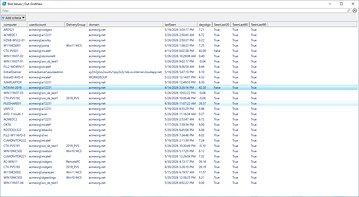
Basically you end up with a list like this.
However. It only shows machines that actually had sessions. If you also want machines that had no sessions, you’ll need to merge/join https://api.controlup.io/reference/getmachinestatsbymachine-1
Your favorite AI chatbot can probably help with that from the attached examples.
If you want a hack though. Either via the API or UI:
• Machine statistics
• metrics as: max
Then look at user session count. If the max user session count for a machine was 0 during a time period it never had users.
For the machines that have more than 0 it won’t tell you if it was 1 day ago or 364 days ago.
It also won’t tell you who the last user was.
But it is a really easy way to see machines that haven’t been used in a time period.
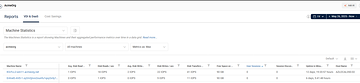
If you filter the user session column you can even create a recurring/scheduled report out of it
Continue reading and comment on the thread ‘Efficient Scripts for Managing Persistent VM Usage in VDI’. Not a member? Join Here!
Categories: All Archives, ControlUp Dashboards, ControlUp Scripts & Triggers