
A discussion was held about using workflows to automate notifications for a high volume of users experiencing low WiFi signal on corporate WiFi. Ideas were shared about centralizing events and using AI features in ControlUp to count the number of affected devices and trigger an email or teams message. The suggested solution involved querying the _devices and device_status to gather relevant data.
Read the entire ‘Automating Notifications for Users with Low WiFi Signal in ControlUp’ thread below:
Good day all
I would like to know if workflows is able to assist with the below
If 10,20,x amount of user are exp an issue with low WiFi signal on the corp WiFi it needs to send an email or teams message
I know that you can do this with alerts but that send an email for every user that’s triggering the alert
I want to pick up a trend
X amount of user are having an issue ( triggering an alert ) workflow will then run automatically and send a notification, email , team , log jira etc
Please
Thanks
I believe that we might need to centralize the events into one place to start other wise the workflow might be heavy/complex
maybe we can use the events to generate the event.
then run a workflow against the events if there is a certain amount in the events over time then run the script
What do you think @member @member
Hi Matthew
Thanks for the reply , I really hope that this can be done within CU and not exporting them outside and then brining it back in
should not need to be outside of Controlup, just in the ControlUp events
@member this will be more an AI ask that you are looking for. so new addition to the AI features that will give u this level of automation.
How simple or complex can it be?
If it can be based on the devices last reported wifi signal strength (assuming it was online within in the last X time). You can simply query _devices.
• wifi signal strength is between 0 and 60
• last_communication is greater than now-5m
• wifi SSID = YourCorporateWifiSSID
Then count how many devices match the query.
get custom data on _devices
“`{
"size": 10000,
"_source": [
"name",
"last_communication",
"wifi_signal",
"wifi_ssid"
],
"query": {
"bool": {
"must": [
{
"range": {
"last_communication": {
"gte": "now-5m"
}
}
},
{
"range": {
"wifi_signal": {
"gt": 0,
"lt": 60
}
}
},
{
"term": {
"wifi_ssid.keyword": "RigNet"
}
},
{
"range": {
"_updated": {
"gte": "now-86400s"
}
}
},
{
"exists": {
"field": "_device_id"
}
}
]
}
}
}“`
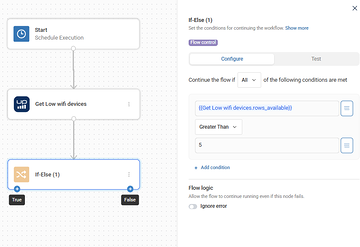
Now if you don’t want to look at just the last status. You’ll have to move from _devices to device_status. Your query will become a bit more complex. But all very doable
PS, this is just a modification of @member’s power outage template.
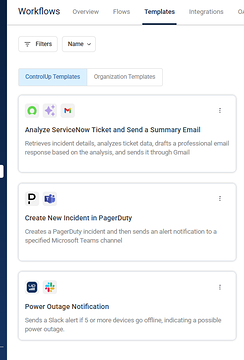
Thanks Dennis , will try this when I get to the office in a few minutes
Continue reading and comment on the thread ‘Automating Notifications for Users with Low WiFi Signal in ControlUp’. Not a member? Join Here!
Categories: All Archives, ControlUp Scripts & Triggers, ControlUp Workflows