
In a discussion about sharing VDI metrics with SLT without revealing unnecessary information, Custom Dashboards with restricted access and a possible upcoming Dashboards feature are mentioned. It is also suggested to export dashboards and send them periodically, but formatting issues may be a concern. The upcoming release for Dashboards for VDI is expected at the end of the month.
Read the entire article here...
ControlUp Dashboards
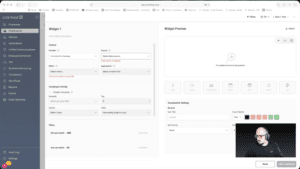
Widget Wednesday #12: Introducing Grid Viewer for Raw Data Exploration
This week’s Widget Wednesday introduces a powerful new widget type in ControlUp Dashboards, the Grid Viewer.
Unlike traditional widgets that summarize data through averages, totals, or grouped metrics, the Grid Viewer gives you direct access to raw data. It’s designed for situations where you want to see exactly what’s happening under the hood and shape the view around your specific needs.…
Read the entire article here...
Read the entire article here...
Managing Applications in ControlUp Widgets
Users were discussing how to exclude applications from a widget in ControlUp. One user suggested using a script for macOS, Windows, and Linux to write to a custom index, while another mentioned a new datasource on the roadmap. @member provided a link to a Script Pack that could help with reporting on processes.
Read the entire article here...
Read the entire article here...
Troubleshooting Outlook Freezes and App Errors
A user reported an issue with Outlook freezing when opening an email due to a large photo in the sender's signature, and suggested correlating app freezes events with the Outlook version. Other users shared known issues with Outlook and app freezes. It was recommended to troubleshoot by checking for large file sizes in signatures.
Read the entire article here...
Read the entire article here...
Exploring ControlUp Workflow: Guidance on Merging Data
A user asked for guidance in their ControlUp Workflow, which involved retrieving data from Intune and ControlUp Desktops and merging it into a single array using the Union action. They had several questions about the process and whether they needed to explicitly convert the results into arrays, iterate through the lists manually, or use the output arrays from previous actions. The user also asked about how to specify matching based on serialNumbers. Another potential approach was suggested, but the user preferred a cleaner array-based solution. A ControlUp team member explained that the feature to merge properties for one object from two arrays is not currently available, so the loop option is the only option for now. No specific solution was provided in the discussion.
Read the entire article here...
Read the entire article here...
Building a Dashboard with ControlUp – Tips and Tricks
A member needed guidance on building a dashboard for devices with and without a certain app installed. Currently, the NOT filter is not supported in the installed app index, so they suggest using a script or workflow and custom index. They will put in a User voice or add it to the roadmap. Scripts have been completed and data reporting is looking good for macOS, Windows, and Linux. It was mentioned that this is great news.
Read the entire article here...
Read the entire article here...
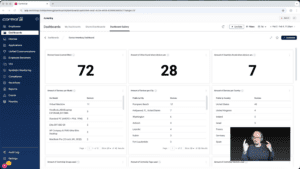
Widget Wednesday #11: Smarter Dashboard Filters, Faster Answers
Widget Wednesday #11 introduces enhanced dashboard filters in ControlUp Dashboards, including improved search, AND/OR logic, and shareable filter-based URLs to streamline device analysis and collaboration.
Read the entire article here...
Read the entire article here...
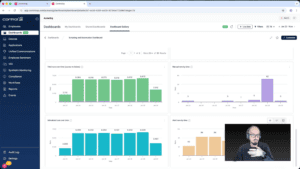
Widget Wednesday #10: Going Beyond Standard Widgets with the Expert Builder
In this episode of Widget Wednesday, we take a closer look at the Scripting and Automation Dashboard, focusing on the Script Execution Summary widget and how it's built.
Read the entire article here...
Read the entire article here...
Clearing Up Confusion About ControlUp Product Management Changes
A user had questions about the changes in product management - events are now in the web and no longer in RTC, but the alert rules are currently only available for the Desktops product. The user also asked if the action library will be fully functional in the web at some point. ControlUp explained that support for VDI is coming and told the user that the Action library (Script-based Actions) is already available in the web UI, with the goal to eventually move all functionality to the platform.
Read the entire article here...
Read the entire article here...
Latest ControlUp Updates: Anomaly Detection & License Reclamation
Busy, busy — no slowing down when it comes to delivering a better DEX experience. Below are two new ControlUp features worth your attention:
1. Anomaly Detection
ControlUp now includes anomaly detection that cuts through alert noise by focusing on behavior rather than static thresholds. Instead of firing every time a metric crosses an arbitrary line, it learns what normal looks like in your environment and flags meaningful deviations.…
Read the entire article here...

Read the entire article here...