
A user was looking for a way to generate email alerts when a column in the console says "Needs Updating’, and to check the status of VMWare servers that may need updating. It was suggested to use an advanced trigger, and once created, to check a test. Additionally, a scheduled trigger can be used to report the status, or Export-CUQuery can be used to dump the data to a CSV file each week. Instructions for running Export-CUQuery in the monitor were provided. Links for the ControlUp Academy and Export-CUQuery Support Docs were given.
Read the entire ‘Generating Email Alerts for VMWare Updates with ControlUp’ thread below:
Is there a script that could check if VMWare Tools updates are available for servers hosted on vSphere?
Its just a column in the console.
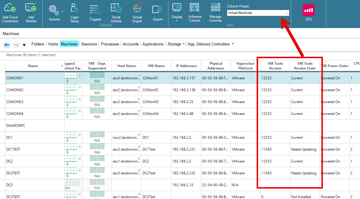
You can group by that column and then run the Update VMware Tools SBA on all the machines in the Needs Updating group.
Filters in solve can do the same thing.
Thanks Landon – is there a way we can generate email alerts where the column says "Needs Updating"?
Yep, advanced trigger.
https://cuacademy.controlup.com/?s=trigger
Created the trigger – how long would it take to detect for a test?
The trigger is only going to fire when the column state changes.
Oh I see, thank you.
Is there a way to have a scheduled trigger to report if the status only says "Needs Updating"
You could use export-cuquery to dump the data every so often to a CSV file.
We’re just looking for a weekly check of what VMWare servers need to be updated if that makes sense
https://support.controlup.com/docs/export-cuquery
Export the machine name and tools status via scheduled task or scheduled trigger.
https://support.controlup.com/v1/docs/monitor-cluster-powershell-fields-by-table#computers
$pathtomodule = (Get-ChildItem "C:\Program Files\Smart-X\ControlUpMonitor*ControlUp.PowerShell.User.dll" -Recurse | Sort-Object LastWriteTime -Descending)[0]
Import-Module $pathtomodule
Export-CUQuery -Table Computers -Fields sName,ToolsVersionState -Search ‘Needs Updating’ -FileName ‘ToolsNeedsUpdating.csv’ -OutputFolder c:\temp
Run that on your monitor.
Thanks!
Continue reading and comment on the thread ‘Generating Email Alerts for VMWare Updates with ControlUp’. Not a member? Join Here!
Categories: All Archives, ControlUp Scripts & Triggers