
A user asked for help with fetching the default report for applications on ControlUp. Another user suggested using an API key and provided a sample API request. The user had already tried inspecting the element and network tabs without success.
Read the entire ‘How to Fetch Default Reports in ControlUp with an API Key’ thread below:
I have pulled custom reports in Powershell by inspecting the tab and using the network tab to get the URL for the report as i was viewing it. That works fine. Now i’d like to fetch the default report for applications. Specifically looking for Chrome by Google. I’ll use this to poke each machine that is behind on the version to update. I cannot seem to fetch the CSV of the default report. Inspecting the element and the network tag aren’t helping me the same way it does with a custom report. How can i get this done in an automated way?
I think you can run automated reports in solve
For like All devices i can fetch those on demand and do whatever i want same with custom reports. That little Export CSV is an awesome way to work in some powershell logic. Then call the CU scripts via API to bridge some of the missing features CU is lacking. Its just the Out of the box default reports i cant seem to get to fetch.
do you have an API key? you can get all the Edge data via API key
What report are you looking for specifically?
yes have API key
the default application installed. filtered down to Google as vendor and Chrome as the App
You can also right click that request > copy as powershell.
Though that’ll copy your user session cookie as well:
the only thing you really need from that "copy as powershell" option is the request URL and the body

same concept but with an API key instead
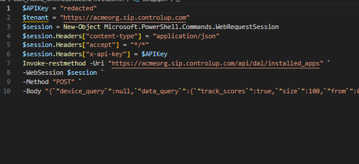
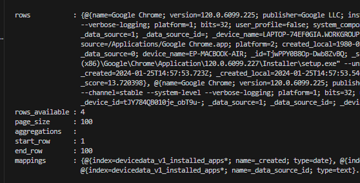
“`$APIKey = "redacted"
$session = New-Object Microsoft.PowerShell.Commands.WebRequestSession
$session.Headers["content-type"] = "application/json"
$session.Headers["accept"] = "/"
$session.Headers["x-api-key"] = $APIKey
Invoke-restmethod -Uri "https://acmeorg.sip.controlup.com/api/dal/installed_apps" `
-WebSession $session `
-Method "POST" `
-Body "{"device_query":null,"data_query":{"track_scores":true,"size":100,"from":0,"sort":[{"name.keyword":"asc"}],"query":{"bool":{"should":[],"must":[{"bool":{"should":[{"wildcard":{"publisher":"google"}},{"match_phrase_prefix":{"publisher":"Google"}}],"must":[],"must_not":[],"minimum_should_match":1}},{"bool":{"should":[{"wildcard":{"name":"chrome"}},{"match_phrase_prefix":{"name":"Chrome"}}],"must":[],"must_not":[],"minimum_should_match":1}}],"must_not":[]}}}}"“`
make sure to plug in your own API key and update the tenant name
Continue reading and comment on the thread ‘How to Fetch Default Reports in ControlUp with an API Key’. Not a member? Join Here!
Categories: All Archives, ControlUp for Desktops, ControlUp Scripts & Triggers