
Several users discussed how to set up a trigger for identifying unused VMs older than 45 days, specifically in relation to the ControlUp environment. Suggestions were given about using the built-in Session Activity report or APIs to identify machines with no recent logins. Some users mentioned testing and recoding scripts for different hypervisors. One user also brought up the issue that not all VMs have a Horizon agent.
Read the entire article here...
Microsoft Related Training & Support Archives
Microsoft training and support-related archives from inside the ControlUp Community on Slack.
Important Notes for Setting Up ControlUp
A user shares a reminder for those setting up ControlUp - be aware that security policies may require manual deployment of browser add-ins. Relevant information and links can be found at https://support.controlup.com/docs/deploy-controlup-for-apps.
Read the entire article here...
Read the entire article here...
Filtering the Session Activity Report for Remote VDI Users.
A user was trying to filter the Activity Report to show only remote VDI users. They were investigating the OU workaround to get the desired data, and questioned how ControlUp determines which OU to show. It was explained that the user would be in a single OU, which is usually determined by a registry key or AD query. However, ControlUp does not query AD by default to minimize congestion. There was a suggestion to go back to the drawing board.
Read the entire article here...
Read the entire article here...
Running User Interactive Scripts with ControlUp for Outlook Teams Add-In Solution
A team member asked if ControlUp can run user interactive scripts, specifically prompting a user to restart Outlook. Another member suggested using a user script through Actions, unless doing it via an Alert. The reason for the restart was to implement an Outlook Teams Add-in disable and re-enable solution through a silent script. This was for the New Teams, not removing the Classic Teams.
Read the entire article here...
Read the entire article here...
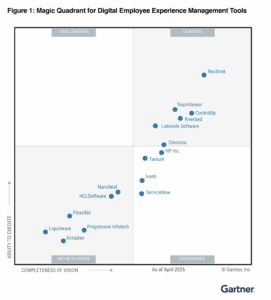
ControlUp Named ControlUp Named a Leader in Gartner’s 2025 Magic Quadrant for DEX — Again!
ControlUp is proud to share... ControlUp has been named a Leader in the 2025 Gartner Magic Quadrant for Digital Employee Experience (DEX) Management Tools. Again.
Read the entire article here...
Read the entire article here...
Troubleshooting Missing Filter Option and Client IP in ControlUp Session Activity Report
A user posted a question about a missing filter option in the Session activity report and troubleshooting why the client IP is not showing. Others chimed in with potential causes and solutions, such as checking for changes in RDP secure gateway, thin clients, and the API. The issue seems to be a bug with the initial client IP column.
Read the entire article here...
Read the entire article here...
ControlUp Week in Review
Happy Tuesday, it’s time for a ControlUp update… what have we been up to? A lot…. That said, here is a recap of the past couple of weeks, in case you missed it ;)
Read the entire article here...
Read the entire article here...
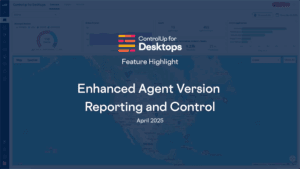
Ehanced Agent Version Reporting & Control
As ControlUp for Desktops continues to evolve with new features and monthly enhancements, staying current with agent versions is more important than ever. To support this, ControlUp now includes a dedicated Agent Version Report, giving IT teams clear visibility into the health and lifecycle of agent deployments across their environment.
This new report shows how many devices are running the latest GA agent, how many are on supported versions, and how many are running agents that are end-of-support and need immediate attention.…
Read the entire article here...
Read the entire article here...
Stay Ahead with Enhanced Agent Version Reporting in ControlUp for Desktops
As ControlUp for Desktops continues to evolve with new features and monthly enhancements, staying current with agent versions is more important than ever.
Read the entire article here...
Read the entire article here...
Investigating Bogus Framebuffer Memory Usage with ControlUp
A user reported experiencing strange values in framebuffer memory usage for certain processes in a customer's Citrix environment with NVIDIA L4-4Q. They discovered that this issue can be caused by a broken Citrix XenDesktop graphics driver and was able to fix it by uninstalling and reinstalling the VDA. This issue has also been observed by Microsoft, who have a similar issue with GPU process memory counters reporting incorrect values. A support ticket has been opened for this issue and the ControlUp community has also seen similar cases.
Read the entire article here...
Read the entire article here...