
A team member requested assistance on obtaining details for different use cases in ControlUp, mentioning needs for non-standard AV analysis, software metering, startup apps analysis, green IT solutions, SCCM client remediation, and patching remediation. A list of available options from ControlUp were provided.
Read the entire article here...
Reporting Related Training & Support Archives
Reporting training and support-related archives from inside the ControlUp Community on Slack.
Troubleshooting VDI Errors in ControlUp Environment
A team member reported an error in their VDI environment, with 600 VDIs affected. One solution is to use the Controllers pane to copy the reg key to the other VDIs, but this only works if they are persistent - alternatively, one can open the golden image or set a group policy to correct the key. Opening a support ticket is also recommended if the issue persists.
Read the entire article here...
Read the entire article here...
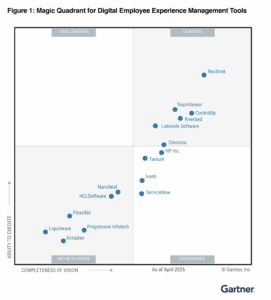
ControlUp Named ControlUp Named a Leader in Gartner’s 2025 Magic Quadrant for DEX — Again!
ControlUp is proud to share... ControlUp has been named a Leader in the 2025 Gartner Magic Quadrant for Digital Employee Experience (DEX) Management Tools. Again.
Read the entire article here...
Read the entire article here...
Understanding Session ID in ControlUp Session Activity Report
A user asked for clarification on the meaning of the Session ID value in the User Session Details section of the Session Activity report. Another user responded that it refers to the Windows session ID and thanked the person who asked for their question.
Read the entire article here...
Read the entire article here...
Troubleshooting Missing Filter Option and Client IP in ControlUp Session Activity Report
A user posted a question about a missing filter option in the Session activity report and troubleshooting why the client IP is not showing. Others chimed in with potential causes and solutions, such as checking for changes in RDP secure gateway, thin clients, and the API. The issue seems to be a bug with the initial client IP column.
Read the entire article here...
Read the entire article here...
How to Access ControlUp’s Battery Usage Report Dashboard
Multiple users asked about ControlUp's Battery Usage Report dashboard and how to access it. It was suggested to check the use case library and ask the CSM about UC078 Edge DX: Battery Usage Report. Others requested access to the dashboard, which is a script and custom index with Grafana for visualization. This was created by Maximilian Pelster and can be shared by contacting Blair. The dashboard is not directly in the user's tenant and instructions and files will be sent to access it.
Read the entire article here...
Read the entire article here...
Considerations for Reporting Latency in Disconnected Sessions
Discussion about whether CU should continue reporting a user's latency when their session is disconnected, which can skew overall statistics. Mention of idle time and how this may impact the reporting. It is noted that some protocols, like Citrix, are set to stop reporting latency after a certain period of idle time.
Read the entire article here...
Read the entire article here...
Ehanced Agent Version Reporting & Control
As ControlUp for Desktops continues to evolve with new features and monthly enhancements, staying current with agent versions is more important than ever. To support this, ControlUp now includes a dedicated Agent Version Report, giving IT teams clear visibility into the health and lifecycle of agent deployments across their environment.
This new report shows how many devices are running the latest GA agent, how many are on supported versions, and how many are running agents that are end-of-support and need immediate attention.…
Read the entire article here...
Read the entire article here...
Testing Application Functionality with Synthetic Monitoring for Citrix-Delivered Apps
A user asked about the possibility of testing application functionality with Synthetic monitoring, specifically for Citrix-delivered apps. Currently, the EUC test only checks the session itself and there is a web transactions test for SaaS apps. However, application functionality testing is not yet included in synthetic monitoring, specifically for Citrix-delivered apps.
Read the entire article here...
Read the entire article here...
Troubleshooting Missing Installed Apps in ControlUp for Windows Devices
A user was having trouble with a Windows device not reporting any installed apps. Another user suggested using the built-in Powershell script to collect this information, which can be found at C:\ProgramData\Avacee\sip_agent\scripts. It runs once a day, but can also be added as an action and run on demand. The necessary details should not be changed in the script.
Read the entire article here...
Read the entire article here...