
• Skip to primary navigation
  • Skip to main content
  • Skip to primary sidebar
  • Skip to footer
ControlUp Community

ControlUp Community

Connect, Learn, and Grow

  • Blog
  • Podcast
  • Meetups
  • Archives
  • Categories
    • ControlUp One Platform
    • ControlUp for Apps
    • ControlUp for Compliance
    • ControlUp for Desktops
    • ControlUp Scripts & Triggers
    • ControlUp Synthetic Monitoring
    • ControlUp for VDI
  • Topics
  • Events
    • Logos & Wallpaper
    • ControlUp.com
  • Join

Troubleshooting an Elevated Child Process Error in ControlUp

Posted on October 23, 2023

A user experienced issues running a script through ControlUp Console, getting an error message about an elevated child process. Dennis suggested it may be due to User Access Control being enabled, however it was not enabled. A further suggestion was to try the script locally with the quiet switch, however it was reported that this made no difference. Dennis explained that the difference was that a hidden window was created in the non-interactive window session.


Read the entire ‘Troubleshooting an Elevated Child Process Error in ControlUp’ thread below:

Good morning. I’m having issues with a script but only when run through console. I get a "Failed to launch elevated child process" error. However when I run the same script locally, using the same credentials it runs without issue. Searching online suggests that the error might be related to a bad path, but I have ruled that out. Has anyone else seen this running scripts only from Console? Just curious if I’m missing something simple before opening a support case.


feel free to open the support case anyway, how does the script action look?


Good morning Wouter. This is the settings…
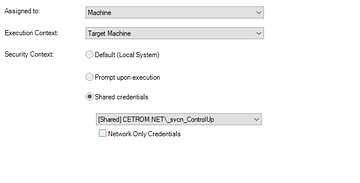
The script is a simple bat file and there are no arguments.


Is user account control enabled? ControlUp doesn’t run actions with an elevated token.


Thank you Dennis. UAC is not enabled.


> ERROR_REQUIRES_INTERACTIVE_WINDOWSTATION


We’ve run the script locally with the quiet switch and there is no interaction. Am I misunderstanding that "interactive windowsstation" message?


No windows can be created in a non-interactive window session. The difference is small but there is a difference between not creating any UI and creating a hidden window. Sure, to the user the result is the same. But for the operating system it isn’t.

None of this really helps you of course. Unless the installer has a switch to not just make the installation quiet but be entirely without a UI


Thanks Dennis. That gives me a little more insight. I’ll dig around some more. I appreciate your time.

Continue reading and comment on the thread ‘Troubleshooting an Elevated Child Process Error in ControlUp’.  Not a member? Join Here!


Categories: All Archives, ControlUp Scripts & Triggers
Topics: Credentials, Microsoft Windows, Reporting, Scripts, Security

Ask Us Anything, Connect, Learn, and Grow with the ControlUp Community!

Login to the ControlUp Community to ask us anything, stay up-to-date on what’s new and coming soon and meet other like-minded techies like you.

Not already a member? Join Today!

Primary Sidebar

ControlUp Academy

Enroll in ControlUp Academy for expert-led technical training, equipping you with skills to effectively deploy, manage, and grow your ControlUp investment.

Learn here >

Rotating Images

Hidden Gem from our Community on Slack!

ControlUp Betas - What's Coming Next?
NEW ControlUp Features - Stay Up-to-Date!
ControlUp Scripts - Scripting, Zero to Hero
Latest KB Articles - Be the First to Learn
Did you Know - with Sivan Kroitoru
Practical Perspectives Technical Use Case Training

Video Tutorials Library

Visit our technical how-to videos, offering step-by-step tutorials on advanced features, troubleshooting, and best practices.

Watch here >

ControlUp Blog

Check out the ControlUp blog for expert advice and in-depth analysis.

Read here >

ControlUp Script Library

Visit the ControlUp technical script library, which offers a multitude of pre-built scripts and custom actions for your monitoring and troubleshooting requirements.

See here >

ControlUp Support

Visit the ControlUp support home and to delve deeper into ControlUp solutions.

Browse here >

Download ControlUp RealTime DX

Start with ControlUp for real-time end-user environment insights, swift troubleshooting, and unprecedented performance optimization. Download now.

Download here >

Footer


ControlUp Community
Of Techie, By Techie, For Techie!

Terms of Use | Privacy Policy | Security
Dive Deeper, Learn more at ControlUp.com

  • facebook
  • twitter
  • youtube
  • linkedin

© 2023–2026 ControlUp Technologies LTD, All Rights Reserved.

We use cookies to ensure that we give you the best experience on our website. by continuing to use this site you agree to our Cookie policy..