• Skip to primary navigation
  • Skip to main content
  • Skip to primary sidebar
  • Skip to footer
ControlUp Community

ControlUp Community

Connect, Learn, and Grow

  • Blog
  • Archives
  • Findings
  • Videos
  • Categories
    • ControlUp One Platform
    • ControlUp for Apps
    • ControlUp for Compliance
    • ControlUp Dashboards
    • ControlUp for Desktops
    • ControlUp for VDI
    • ControlUp Scripts & Triggers
    • ControlUp Synthetic Monitoring
    • ControlUp Workflows
  • Topics
  • Meetups
  • Events
    • Logos & Wallpaper
    • ControlUp.com
  • Join

Troubleshooting Monitor Deployment Issues in ControlUp with Trellix

Posted on October 31, 2024

A user encountered issues with the deployment of monitors while using the Real-Time console, resulting in errors and failed services. Another user suggested the issues may be caused by Trellix, a common problem for page timeouts. The solution offered was to either increase the timeout or add the monitor service executable to exclusions. The issue is commonly seen with Trellix but can also affect other antivirus or security tools.


Read the entire ‘Troubleshooting Monitor Deployment Issues in ControlUp with Trellix’ thread below:

After managing to correctly install and run Solve and Insight appliances, I’ve got some issues with the monitors deployment. The monitors deployment using the Real-Time console finishes by reporting “installation successful but there are some errors” and the monitor services not started.

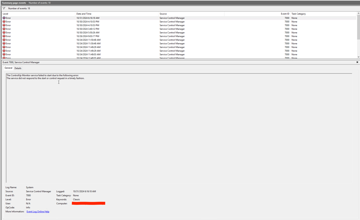
I connect to the monitor and look at the Window Event Viewer : Event 7000 is raised with issues for the CUmonitor service. Do you have an idea for that ?

I manually start the service on my 2 monitors, it failed once and started successfully the 2nd time… So weird 😕

Thank you again for your help…

PS1 : my firewall allows inbound connections for ports 40705 and 40706.

PS2 : my control up service account is administrator of the monitor servers.

In CU Console > Settings > Monitors, Ehen you check the errors (details) do you See „401 Unauthorized“ message?


Service timeouts are usually due to antivirus or security tools.

You can try increasing the timeout or adding the monitor service executable to exclusions.

For increasing the timeout. You’ll need to restart the machine for changes to take effect, as far as I’m aware.

> Key: HKEY_LOCAL_MACHINE\SYSTEM\CurrentControlSet\Control\

> Value: ServicesPipeTimeout

> Data: 60000 (decimal)

> Type: DWORD

The issue is commonly seen with Trellix. But it seems to happen with other AV/security tools as well. See https://controlupcommunity.slack.com/archives/C046L6BV4H5/p1695822487616099


Thank you for your answers. I was not able to have a look during the afternoon, but @member may suggest the culprit : there is Trellix !

I will check both of your ideas. Thanks very much.

Continue reading and comment on the thread ‘Troubleshooting Monitor Deployment Issues in ControlUp with Trellix’.  Not a member? Join Here!


Categories: All Archives
Topics: Antivirus, ControlUp Solve, Firewall, Multiple Monitors, Reporting, Security

Ask Us Anything, Connect, Learn, and Grow with the ControlUp Community!

Login to the ControlUp Community to ask us anything, stay up-to-date on what’s new and coming soon and meet other like-minded techies like you.

Not already a member? Join Today!

Primary Sidebar

ControlUp Academy

Enroll in ControlUp Academy for expert-led technical training, equipping you with skills to effectively deploy, manage, and grow your ControlUp investment.

Learn here >

Rotating Images

Hidden Gem from our Community on Slack!

ControlUp Betas - What's Coming Next?
NEW ControlUp Features - Stay Up-to-Date!
ControlUp Scripts - Scripting, Zero to Hero
Latest KB Articles - Be the First to Learn

Video Tutorials Library

Visit our technical how-to videos, offering step-by-step tutorials on advanced features, troubleshooting, and best practices.

Watch here >

ControlUp Blog

Check out the ControlUp blog for expert advice and in-depth analysis.

Read here >

ControlUp Script Library

Visit the ControlUp technical script library, which offers a multitude of pre-built scripts and custom actions for your monitoring and troubleshooting requirements.

See here >

ControlUp Support

Visit the ControlUp support home and to delve deeper into ControlUp DEX solutions.

Browse here >

Footer


ControlUp Community
Of Techie, By Techie, For Techie!

Terms of Use | Privacy Policy | Security
Dive Deeper, Learn more at ControlUp.com

  • facebook
  • twitter
  • youtube
  • linkedin

© 2023–2026 ControlUp Technologies LTD, All Rights Reserved.

We use cookies to ensure that we give you the best experience on our website. by continuing to use this site you agree to our Cookie policy..