
A user asked about the possibility of passing text/fields from a Windows event log message as arguments for a script action using the Windows event based trigger. Another user noted that this is not currently possible but can potentially be implemented in the future. They provided a link to a support document and explained how to access the necessary information using a sample event based object. Another user suggested using this feature for automated actions based on specific error criteria. Another option is to use built-in actions like reset VM which utilize the ControlUp service account for the hypervisor. ControlUp Academy may have more resources on this topic.
Read the entire ‘Using Windows Event Based Triggers for Automated Actions in ControlUp’ thread below:
Hi, Is it possible for certain defined text / fields in the body of a windows event log message to be passed as arguments to a script action when using the windows event based trigger ?
Sounds interesting. I don’t think that’s possible today, but would need to check
@member have you looked into this at any point
https://support.controlup.com/docs/automated-actions-how-to-pass-trigger-related-parameters
$CUTriggerObject.Event.EventFullMsg
Assuming you checked the "execute script with .NET engine" checkbox, a variable named $cutriggerobject will be available inside the script. One of the properties is $cutriggerobject.event.eventfullmsg
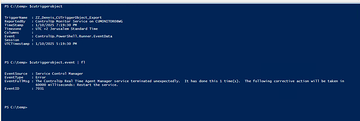
Since CUTriggerObject is only available when a script is ran via an automated action, it can be hard to understand the content. Here’s a snippet that’ll make a sample event based object available outside of automated actions.
$cutriggerobject = Import-Clixml C:\temp\cutriggerobject.xml
and then put the attached cutriggerobject.xml in c:\temp.
If you want to access other sample cutriggerobject objects, let me know. I can explain how to export it
That’s a pretty good article! Could something like this be used to perform an automated action based upon an error?
For example, if we have a particular crash event that occurs and we have text in a Windows event log – what we would want to do is have this automated action run on a regular interval to grab CUTriggerObject output, then we can have a follow-up action performed if the output from CUTriggerObject matches the trigger for the action.
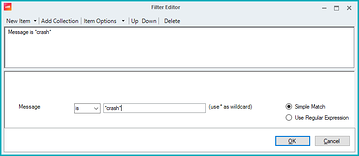
yeah but you can filter triggers on message text. If that is what you’re looking for.
Or alternatively, you can call existing CU actions using this. These actions include built-in actions like reset VM. Which would use the CU service account for that hypervisor. So you won’t have to worry about credentials.
Continue reading and comment on the thread ‘Using Windows Event Based Triggers for Automated Actions in ControlUp’. Not a member? Join Here!
Categories: All Archives, ControlUp Scripts & Triggers