
A user encountered an issue with the new live features on ControlUp, specifically with the management option for file and registry browsing. After troubleshooting, it appears to be a permissions issue and potentially a global feature flag. The user was advised to log with support for further assistance.
Read the entire ‘Troubleshooting the Management Option for File and Registry Browsing on ControlUp Live Features’ thread below:
Hey all, I wasn’t able to see the webinar for the live features, but this is super exciting to have! I think I am missing something though…
I have a custom role that is assigned by SAML login to users based on their SSO group in AD. Each role has the permissions we want them to be able to access.
that being said, I have enabled our system engineers to have full control, and I have ensured their role has the new features enabled. I have checked all of the boxes for the role permissions but am missing management option. I can see the Network and Storage features, just not management for file and registry browsing.
I have also double checked that the target device is running the new agent.
Am I doing something silly? 😄
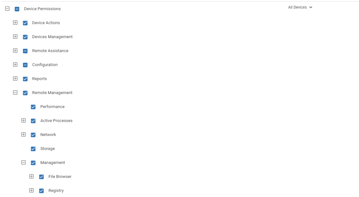

can you try it with Browser incognito mode
Trying now
No dice
can can test in a bit if i see the same but suggest u log with support
You have 2.17.7 agent deployed?
need it to see the other options as well – yes….
Yessir, I can see real time data in both of those other modules as well.

If the other tabs show (device is online, windows and correct agent) AND the management tab shows for others (feature flag is set/enabled) it almost has to be permissions. Because as far as I’m aware the feature flag is per organization (most likely global now).
Continue reading and comment on the thread ‘Troubleshooting the Management Option for File and Registry Browsing on ControlUp Live Features’. Not a member? Join Here!
Categories: All Archives, ControlUp for Desktops, ControlUp Live Remote Management