
In a discussion about sharing VDI metrics with SLT without revealing unnecessary information, Custom Dashboards with restricted access and a possible upcoming Dashboards feature are mentioned. It is also suggested to export dashboards and send them periodically, but formatting issues may be a concern. The upcoming release for Dashboards for VDI is expected at the end of the month.
Read the entire ‘Controlling Access to VDI Metrics with ControlUp Custom and Upcoming Dashboards’ thread below:
Hello.. we have been using controlup for a year or so, but never ventured in here much as i am not a slack user and it just puts me off.. ha.. anyway i have bitten the bullet and here i go.. I have done many searches for this but pretty much drawn a blank.. apologies in advance..I need to provide access to a dashboard that shows basic vdi metrics to our SLT, but i dont want to be able to give them access to the default shared dashboards as they will see other info that is irrelevant to what they need and may ask questions and waste everyones time.. therefore is it possible to create a custom dashboard and only show it to a subset of users.. i have been told it is possible by restricting it with RBAC but i have drawn a blank. I can restrict it so they see that dashboard under VDI and along with the out of the box shared VDI Dashboards.. they can also navigate the folders on the left which i also want to hide.. If it is possible, is this documented anywhere? Or do we need to wait for the new Dashboards feature for VDI.. I just want them to log in and see a single dashboard, no drop downs, no other options they can fiddle with or click into 🙂 any advice would be awesome..
Hey Ben, as far as I’m aware, you cannot do this today. You’re right. You can restrict access to VDI > dashboards (we call it overview I believe) but they’d still be able to see other dashboards.
The actual Dashboards feature/section (2nd icon on the top left) is currently all or nothing as well. Though I believe that a feature that would help you is on the roadmap. I’ve heard both per dashboard RBAC and a feature being discussed.
@member is that your responsibility?
If you cannot wait, there are options if you’re okay with using external tools like Grafana or PowerBI
Hi @member welcome on slack! Good that your here. So first of currently the Custom Dashboard feature (so the dashboard button on the right menu, it might not be visible if you only have VDI license atm) doesnt have VDI data, YET! But it will at the end of this month. We will start out with session data and quickly at more and more tables. But as @member mentioned it now has private dashboards and shared dashboards, Shared dashboards are directly shared with everyone. You could export a dashboard and let the people that need it import it as a private dashboard that way they have what you want. RBAC on a per custom dashboard level is something we are exploring in Q2!
@member do you maybe have an idea for Ben in the current VDI dashboards/reports section ?
The current dashboards solution we have is limited in terms of RBAC. Which you’ve already found out @member. It’s an all or nothing deal.
The new dashboards feature would fit your ask as @member mentioned and it’s coming pretty soon.
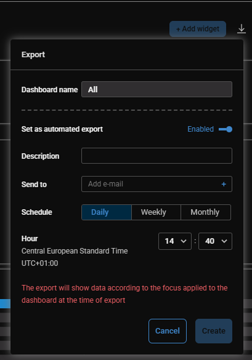
To bridge the gap grafana or powerbi would be an option but it’s a bit of effort I can imagine you don’t want to spend now. You could also try the Automated Export function for the current dashboards under VDI. You can schedule an export and email it to people directly. It wouldn’t require any access to the console and they only see what you want them to see. But it’s limited to once per day, week or month. I don’t know if you require a live data view or if you’re happy with sharing it periodically.
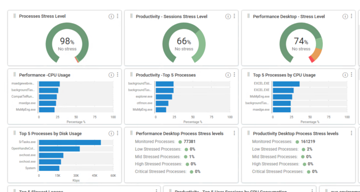
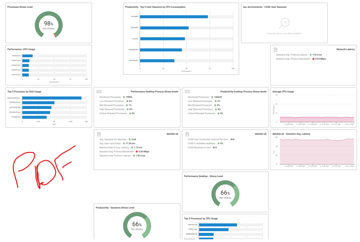
Hi all. thanks for the replies, much appreciated.. We had a look at piping out to PowerBI, but didnt make too much headway.. We also tried the scheduled export and then email into a teams channel, where they can be added.. Only problem is that the they wont really want to click a link to download a PDF and then once the PDF comes down, the formatting of it doesnt really resemble the formatting on the screen.. I dont suppose you have any tips for that? I have attached what we see on screen and how the PDF comes out… looks decent on screen but all over the place on a PDF………
Does anyone know any timescales for the release of the new fancy dashboards for VDI? If you need guinea pigs/testers, then look me up.. Cough cough @member 🙂
We can see if we enable you a bit ahead of schedule. But there isn’t much room between ‘it works’ & ‘we release it’. Currently we’re looking at releasing it end of this month.
That formatting makes it awkward though I understand. Let me see if there’s something I can do about that. Spoiler: that might actually be slower then the release of dashboards for VDI.
The formatting is likely due to browser and pdf rendering issues. The default dashboards render properly for me in PDF (both scheduled & on-demand).
You can play around with resizing the boxes this might tackle your issues.
Hi Sonny.. thanks for this, we have already been playing around to see if we can make it better looking just by resizing it all… its a work in progress here, fun friday afternoon job.. I think though our long term solution sounds like we need to wait for the dashboards though..
Continue reading and comment on the thread ‘Controlling Access to VDI Metrics with ControlUp Custom and Upcoming Dashboards’. Not a member? Join Here!
Categories: All Archives, ControlUp Dashboards, ControlUp for VDI