
A user created triggers for "Black Hole Machines" and "Registration Failures" but noticed the event severity was only showing as Informational in the DEX Console. They asked for assistance in changing the severity and shared a screenshot. However, it was confirmed that the severity cannot be changed at this time but may be considered in the future. The user wanted to use this value for reporting dashboards and trends. Support was following up on the issue and confirmed that the severity cannot be changed and all triggers will still create an event, regardless of the register event action configured. The trigger was originally set up to send a webhook to Google Chat, but this was changed to a PowerShell script triggered through Script Action to create ServiceNow incidents in the future. There is no way to define the severity of the event at this time.
Read the entire ‘Event Severity Issues in ControlUp DEX Console’ thread below:
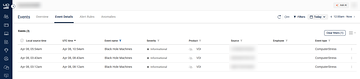
Hi everyone, I’ve created two Triggers, one for "Black Hole Machines" and one for "Registration Failures." Within the DEX Console, the event severity is showing as Informational. Where do I go to change it to something else?
Can you please share a screenshot of these events @member?
Cc @member @member
Sure, here you go:
I don’t think there’s a way to define the severity at the moment.
@member just to confirm. You’ve created a trigger with the real-time console? Which uses those fields in the filter criteria. Did you define a specific follow-up action?
Yes, it was created in the real-time console, and right now it is sending a webhook to Google Chat. In the future, we plan to run automation and create ServiceNow incidents.
Let me clarify. The webhook is actually a PowerShell script triggered through a Script Action. I am not sure whether that makes a difference, or if the PowerShell script can be updated to change the severity.
No I don’t think so, this event severity is probably hardcoded somewhere. I don’t think it’s something that can be changed at this time.
It’s something we can consider making configurable though. Are you planning to use this value somewhere down the road?
As more and more of the VDI metrics being sent to the DEX console are now being shown in the Events module, we would like to use severity for reporting dashboards, reporting trends, and similar purposes.
@member I’m following up with this issue from Support
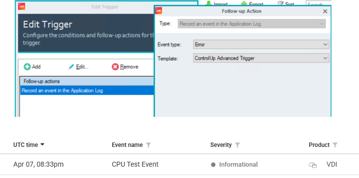
I reproduced it with a Register Event follow-up Action (Error level), and the event still showed up as Informational in DEX
Just making sure we handle this properly from the Support stand point
The register event writes an event to the windows event log this is from way before we even had a dex platform. That works as it should.
After migrating incidents, which didn’t have a severity afaik, to dex events we never considered the severity to be configurable. All triggers created an incident, so all triggers still create an event today. Regardless of the register event action you configured.
got it
Continue reading and comment on the thread ‘Event Severity Issues in ControlUp DEX Console’. Not a member? Join Here!
Categories: All Archives, ControlUp for VDI, ControlUp Scripts & Triggers