
The customer is looking for a training or documentation on creating custom dashboards for VDI. @member suggests a community session on the topic was conducted but the customer's requirement is slightly different. @member offers to help and mentions the upcoming release of VDI dashboard in the gallery. Unique count and time series for VDI support are expected to be released next week and early next month respectively.
Read the entire article here...
ControlUp for VDI (Real-Time DX) Training & Support Archives
ControlUp for VDI (Real-Time DX) training and support-related archives from inside the ControlUp Community on Slack.
Troubleshooting Access to VDI Console in ControlUp Academy
A user was having trouble accessing the VDI console and reached out for help. Another member asked for the support ticket number and suggested checking the organization member group settings. Eventually, the issue was resolved by temporarily setting the permission to "Deny" and then back to "Allow". It was noted that this issue had been ongoing for a year in another tenant manager.
Read the entire article here...
Read the entire article here...
Retention Period for Audit Log in DEX Console at ControlUp
A user asked about the retention period for the audit log in the DEX console. Another user noted that it may depend on the license tier, but the support article states a retention period of 1 year. Another user shared their experience of having 10,000 records dating back to last August. The conversation shifts to discussing the potential challenges of a limited retention period. The topic of documentation is also mentioned. It is suggested to update the documentation to include information about the retention period.
Read the entire article here...
Read the entire article here...
Widget Wednesday #16: Building Dashboards with VDI Data
Widget Wednesday #16 introduces VDI data integration in ControlUp Dashboards, enabling users to build custom dashboards with machine, network, and NetScaler session data for deeper performance insights.
Read the entire article here...
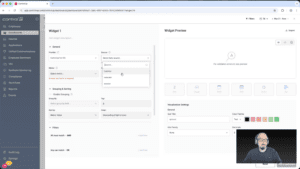
Read the entire article here...
Event Severity Issues in ControlUp DEX Console
A user created triggers for "Black Hole Machines" and "Registration Failures" but noticed the event severity was only showing as Informational in the DEX Console. They asked for assistance in changing the severity and shared a screenshot. However, it was confirmed that the severity cannot be changed at this time but may be considered in the future. The user wanted to use this value for reporting dashboards and trends. Support was following up on the issue and confirmed that the severity cannot be changed and all triggers will still create an event, regardless of the register event action configured. The trigger was originally set up to send a webhook to Google Chat, but this was changed to a PowerShell script triggered through Script Action to create ServiceNow incidents in the future. There is no way to define the severity of the event at this time.
Read the entire article here...
Read the entire article here...
How to Match Multiple Drives Using Regex?
A user asked for help in matching both C and D drives using regex but wasn't successful. Other users suggested using a collection group instead.
Read the entire article here...
Read the entire article here...
Troubleshooting ControlUp Agent Installation Errors for New Dev Environment Setup
A user encountered an error when setting up a new dev environment with the ControlUp agent. Another user suggested checking if the machine was already added to the console or if the agent was previously installed in another environment. It was advised to open a support ticket for faster assistance.
Read the entire article here...
Read the entire article here...
Troubleshooting frame buffer bottlenecks on Horizon VDI machines with vGPU.
A user is experiencing frame buffer bottlenecks on their Horizon VDI machines with vGPU. They notice a high load in the machine view but all processes seem to be at 0% or N/A. Another user suggests checking system-owned processes and recommends looking at both PerfCounters and Nvidia SMI. There is an open bug for this issue, ado #298634.
Read the entire article here...
Read the entire article here...
Investigating Traffic Spikes in ControlUp Citrix VDI Environment
A user reported significant spikes in traffic in their Citrix VDI environment and suspects that ControlUp's VDI agent may be causing it. However, they are not sure if ControlUp uses Akamai for their CDN services. Other users suggested using the command "netstat -ano | findstr akamaitechnologies" to check for any processes using Akamai. The investigation will continue.
Read the entire article here...
Read the entire article here...
Troubleshooting High Logon Durations on Citrix Images
A user asked for troubleshooting tips regarding high logon durations on a new MCS Citrix image. Other members suggested using the analyzer and running Promon as the user logs on to isolate the issue. A reference to a helpful discussion was also provided.
Read the entire article here...
Read the entire article here...