
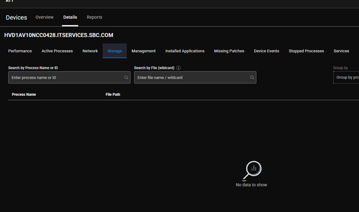
A user reports that the Storage tab is not showing reliably in the recently installed newer Desktop Agent for a large VDI pool with around 1000 non-persistent machines. They haven’t seen any reports of this issue and suggest opening a support case for further investigation. Another user adds that kernel ETW messages may be used for this feature and advises the user to provide more details on how the data is collected for troubleshooting. The affected machines are single-session and a new image is being rolled out, so the user will check if the issue persists and create a case if needed.
Read the entire ‘Storage Tab Not Showing Reliably in ControlUp Desktop Agent’ thread below:
We got the newer Desktop Agent installed for a large VDI pool and it is a great addition/improvement! We did notice the that Storage tab is not showing reliably. We installed this a single pool of about ~1000 machines, all of them are non persistent on the same pool from the same master image. I would say on about 1/2 of the machines that we look at that have an active user does not display this information. Other Live RMM tabs are working fine including network, we are on 2.17.7.7838 (GA). Has anyone else reported this or is there any tips or fixes? We can open a case, but was hoping someone has run across this and knows a fix.
@member not sure to what extent this was fully tested for multi-session, but can you take a look?
Multi-session should have have any influence here, because the agent is running as system and the storage data that it reports is system-wide.. Please open a support case for this, so we can investigate. I haven’t seen anything that specific for the storage tab. The sip agent logs might shed more light on this problem.
And I think these are single user VDI Windows 11 VMs..
I am afraid we would need a support ticket @member
I believe we are using kernel ETW messages for this feature, maybe @member you can add some more details on how this data is collected, to help with some initial troubleshooting
These are single session non persistent machines, we don’t use a shared model. We are rolling out a new image in the next couple of weeks, I will check if the issue persists and create a case if needed. Thanks!
Continue reading and comment on the thread ‘Storage Tab Not Showing Reliably in ControlUp Desktop Agent’. Not a member? Join Here!
Categories: All Archives, ControlUp for Desktops, ControlUp Live Remote Management